
Customer support for pharma CRM is the technical, operational, and user assistance that helps pharma companies implement, run, and maintain their CRM effectively. Good pharma CRM support should cover rollout, go-live, issue resolution, escalation, ongoing system changes, and access to a support team who understand both the platform and the customer’s commercial processes.
Customer support for pharma CRM affects how quickly problems are solved, how confidently users work in the system, and how easily the CRM can adapt as the commercial organisation changes. Without proactive and reliable customer support, unresolved problems can put CRM projects at risk.
That’s why customer support should start way before go-live.
A new pharma CRM has to be configured around the company’s processes, loaded with usable data and understood by the people who will work in it.
Reps then need help as the system goes live. Months later, administrators may need to change an existing setup, add users, import data or ask the vendor for help with work the customer can’t handle internally.
For mid-sized pharma companies without large internal CRM teams, the quality of that support can make a major difference to the day-to-day value of the CRM system.
Giving customers access to a ticketing portal is only one part of it.
What does good pharma CRM customer support actually include?
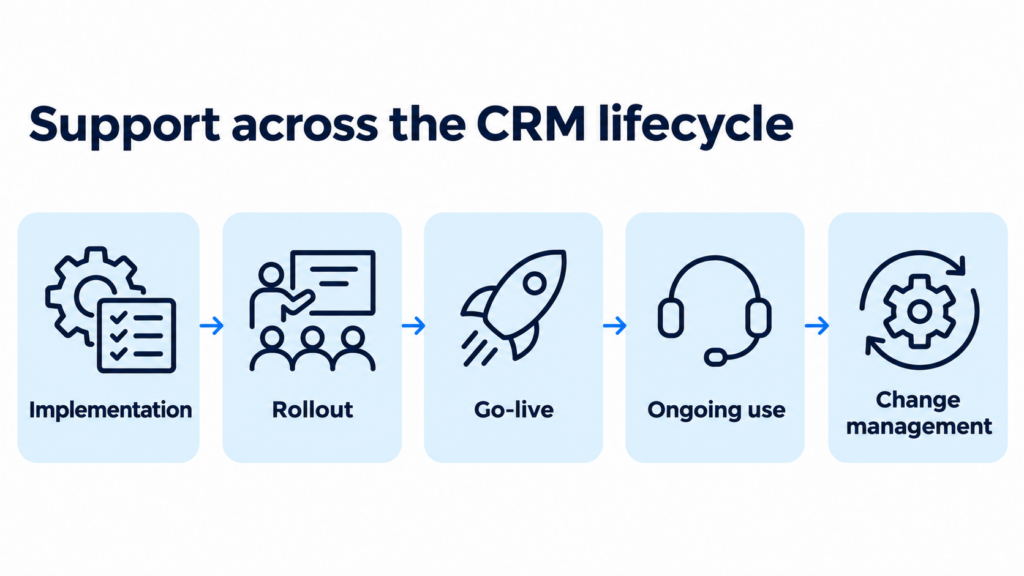
Good pharma CRM customer support covers different needs at different stages of the CRM lifecycle.
Some requests are straightforward software problems. A user can’t log in, a function behaves incorrectly, or a bug needs technical investigation.
Others require knowledge of the customer’s CRM setup and commercial processes. An administrator may need help changing an existing workflow, a sales manager may not understand why information is appearing in a particular way, or a new market may need support using an established corporate setup.
The support model needs to accommodate all the specific requirements of a pharma company.
| Stage of pharma CRM lifecycle | Typical vendor support for each stage | What excellent pharma CRM support should provide |
|---|---|---|
| Implementation | Configuration, data preparation, training and setup questions | Direct access to people who understand how the CRM is being implemented |
| Rollout | User questions, process clarification and early adjustments | Fast feedback between users, administrators and the implementation team |
| Go-live | Higher volume of user questions and unexpected problems | Clear escalation, rapid issue triage and extra support where needed |
| Ongoing use | Product issues, new users and changing business requirements | Reliable technical support and continuity of customer knowledge |
| Change management | New markets, processes or additional operational work | A clear route for work outside standard SaaS support |
Customers should also know where standard product support ends.
Platform administration, significant configuration work, data imports, new analytical outputs or advisory work may not be included in the basic licence. That’s entirely reasonable if the boundaries, what package tiers include, and pricing are all clear before the customer needs them.
Why is pharma CRM customer support so important?
CRM problems rarely stay isolated.
If a rep can’t complete a call report correctly, the customer history can become incomplete. If users interpret a field differently, the information captured across the field force can become inconsistent. If an outdated process can’t be changed easily, people may begin working around the CRM.
Those workarounds can eventually become a bigger problem than the original issue.

Support also affects user confidence. Reps who can get useful answers quickly have less reason to abandon the agreed process, and administrators who know where to go for help can resolve problems before they start spreading and getting worse.
There is another important effect: knowledge transfer.
A pharma company should become more capable of running its own CRM as its administrators gain experience. Good vendor support helps them do that rather than creating unnecessary dependence by keeping routine knowledge locked away on the vendor’s side.
Stage 1: Pharma CRM support during implementation
Customer support should already be operating while the pharma CRM is being implemented.
The customer and vendor are making decisions about workflows, user roles, data, and field processes that will affect the system after launch. Some questions only become visible once users begin working with realistic data and day-to-day scenarios.
Training alone doesn’t solve that.
A process may make sense during a workshop but fail to work as intended in real-world use. Reps might all misunderstand the same step, or an administrator might find out that a particular setup doesn’t work as expected.
The support route needs to feed that information back to the vendor quickly, so the team can resolve the issue.
Companies should also agree who handles what before rollout begins.
Reps need to know where to ask for help and internal administrators need to be clear about which requests they can resolve themselves and which should be sent to the vendor.
Stage 2: Pharma CRM support at rollout and go-live
Go-live can create a temporary spike in support demand.
Users are working with the live CRM, real customers, and real healthcare data while trying to continue doing their normal jobs. Problems that never appeared during testing can emerge and need to be quickly solved.
At the moment of rollout, the customer support team needs to separate several different issues:
| Pharma CRM go-live issue | Appropriate support response from CRM vendor |
|---|---|
| User doesn’t understand a process | Guidance or additional training |
| Existing setup needs adjustment | Configuration review |
| CRM function isn’t working correctly | Technical investigation and issue resolution |
| Critical functionality is unavailable | Immediate escalation under the agreed SLA |
Treating every request as the same type of ticket just slows everyone down.
Go-live support also provides useful evidence about the rollout itself. If multiple users ask the same question, training may need improving. If one workflow repeatedly causes confusion, the process itself may need to be changed.

Stage 3: Pharma CRM support during ongoing use
The CRM has to keep working after the project team has moved on.
Circumstances don’t remain static: new field reps join, people change roles, and territory structures change. Then new products launch, new markets are added, and commercial processes evolve.
Some changes can be handled internally but others need vendor involvement.
Buyers therefore must look beyond implementation when comparing CRM vendors. A system may be straightforward to launch but frustrating to own if routine support is slow or every small change becomes a new consulting project.
Before signing the contract, check who provides ongoing support, what the licence includes, and what additional work costs. Use the vendor checklist below for reference because these details become much harder to negotiate once the CRM is already running.
What should a pharma CRM service desk actually handle?
A pharma CRM service desk should give users one reliable place to report product problems and request help.
Typical requests include:
- login and access problems
- errors and unexpected system behaviour
- questions about existing functionality
- technical incidents
- problems requiring escalation to specialists
The service desk should not simply forward tickets.
A user might report that “the CRM is broken” when the underlying problem is a configuration rule, incorrect data or misunderstanding of the process. First-line support needs enough knowledge to identify where the request belongs.
Ticketing also creates a useful record of what happened, how serious it was, what was done and how the problem was resolved.
Repeated tickets can reveal wider problems too.
Ten users asking the same question may indicate a training or usability issue that should be fixed once rather than answered repeatedly.
What should pharma CRM support SLAs and escalation cover?
Support SLAs should make clear what happens when something goes wrong.
A minor issue affecting one optional function shouldn’t receive the same response as a problem preventing an entire field force from working.
At minimum, customers should understand:
| SLA provision | What the pharma company client should know |
|---|---|
| Severity | How critical, major and minor incidents are defined |
| Response | When the vendor will first respond |
| Escalation | Who becomes involved if first-line support can’t resolve the issue |
| Availability | When support is available for different levels of severity |
| Communication | How progress and resolution will be reported |
For example, Inception CRM provides standard support with every licence through phone, email, WhatsApp, Microsoft Teams and its ticketing system. Critical issues have free 24/7/365 on-demand assistance.
Buyers should understand arrangements like these before an urgent problem occurs.

Stage 4: Pharma CRM support for change management
Not every support request involves something being broken. Sometimes change management is the driver, with changing business needs requiring customer support from the CRM vendor.
A company may need help updating rep territories, importing HCP and HCO data, or carrying out work that its own administrators don’t have the time or expertise to handle.
These requests sit between ordinary technical support and a larger implementation project.
Customers should know which side of that boundary each request falls on.
Flexible operational-support packages can help because demand rarely stays constant. A company may need more assistance during rollout, less after administrators gain experience and another burst of support when a new market or process is introduced.
For multi-country organisations, a shared support pool can also make more sense than forcing each affiliate to purchase an identical service package.
What do pharma CRM vendors and customers often get wrong about support?
Weak support models aren’t always caused by the vendor. Pharma companies can create problems themselves if they fail to plan how the CRM will be supported after launch.
| CRM vendor mistake | Pharma company mistake | Likely consequence |
|---|---|---|
| Support team has little knowledge of the customer setup | No clear internal CRM owner | Problems take longer to understand and resolve |
| Implementation knowledge disappears after go-live | Go-live treated as the end of the project | Customer loses continuity just when real-world issues start appearing |
| Every small change becomes consultancy work | No distinction between incidents, questions and change requests | Support becomes slower and more expensive |
| Tickets are measured by closure rather than resolution | Different teams send conflicting requests directly to the vendor | Problems may be technically closed without improving the underlying process |
| Little knowledge transfer to customer administrators | Internal capability is never developed | Customer remains unnecessarily dependent on the vendor |
The best support relationship avoids both sets of problems.
The vendor retains enough customer knowledge to understand the system properly, while the pharma company maintains internal ownership and becomes more self-sufficient over time.

What should pharma companies ask about CRM support before choosing a vendor?
Support should be evaluated before the CRM contract is signed.
Ask:
- What customer support is included with the CRM licence?
- Who will be our regular contact after implementation?
- Which support channels are available?
- How are critical problems escalated?
- What does the SLA actually guarantee?
- Which requests count as standard support?
- What work costs extra?
- Can additional assistance be bought as a predictable allocation?
- Can several countries share the same support allocation?
- Can the support level change as our internal team becomes more experienced?
These answers also affect total cost.
A CRM with a competitive licence price can become expensive if routine changes repeatedly require separately scoped consulting work.
How does Inception CRM customer support work?
Inception CRM separates standard SaaS support, which is included with every licence, from optional operational assistance for customers that want the Inception team to carry out additional work.
| Included with every Inception CRM licence | Optional operational assistance |
|---|---|
| Issue resolution | Platform administration |
| Platform maintenance and updates | Data imports and data-management work |
| Hosting and data storage | Changes to existing configurations |
| Security monitoring and availability | Additional agreed reports or dashboards |
| SLA support through the ticketing system | System consultation |
| New versions and upgrades | Sales force effectiveness advisory work |
| Named account-management relationship | Other agreed operational work |
| 24/7/365 assistance for critical issues | Allocated service hours according to the selected package |
This keeps routine product support separate from additional hands-on work that some customers want the vendor to perform for them.
Support during implementation and rollout
Inception implementations are delivered directly rather than passed to a third-party integrator.
Implementation covers the agreed work required to prepare the CRM for use, including configuration, data loading, and end-user training.
That direct and personal relationship continues after launch, so the people supporting the customer are not starting from scratch once the system goes live.
As the customer’s own administrators become more experienced, they can take over more routine management while retaining access to Inception when additional help is required. naturally, this decreases service costs at the same time.
Extra operational support when customers need it
Support demand does not stay constant after rollout.
Some customers want Inception closely involved in administration and day-to-day changes. Others prefer to manage most work internally and use additional assistance only when something falls outside their own capacity.
Inception therefore offers optional operational-support packages:
| Inception CRM support package | Operational assistance included |
|---|---|
| Bronze | 4 hours per month |
| Silver | 8 hours per month |
| Gold | 20 hours per month |
| Platinum | 40 hours per month |
Larger organisations can also use a corporate support pool rather than assigning separate packages to individual markets.
That allows the available hours to be used across countries and different types of support work according to where demand is highest.
This can be particularly useful during multi-country rollout, when one affiliate may need substantial help while another is already largely self-sufficient.
The support level can then be reviewed as the organisation develops greater internal capability.
Good pharma CRM support should make customers more self-sufficient
Without strong customer support, even a well-chosen pharma CRM project can fail. Poor support can slow issue resolution, undermine user confidence, and encourage workarounds. The best support model helps customers become more self-sufficient while keeping expert help available.
Users need fast help when something is wrong. Administrators need access to people who understand the platform when they reach the limits of their own knowledge. Commercial teams need a practical way to request additional work when business requirements change.
At the same time, the customer should gradually become more capable of handling routine administration itself.
That’s why customer support for pharma CRM deserves the same scrutiny as functionality, implementation and price when companies compare systems. Check how each vendor supports implementation, go-live, ongoing use, change requests, and critical issues.
Ask Inception CRM to walk you through the support included with your licence and the options for additional operational assistance. If reliable customer support matters to you, it’s worth having a conversation with us.
Christopher Crawford is Head of Marketing at Inception CRM. He writes about the real-world strengths, weaknesses, and trade-offs of CRM, B2B, and B2C software, helping teams make clearer, more informed technology decisions.
FAQ: Pharma CRM customer support
In customer support response time measures how quickly the vendor provides an initial response, as defined in the SLA. Resolution time measures how long it takes to resolve the issue. Check whether the contract specifies targets for both and how they’re measured.
Include the affected function, what went wrong, when it happened, and how many users are affected. Provide steps to reproduce the issue, any error message, and relevant screenshots. Remove sensitive information and never include passwords.
Yes. Ask to speak with customers whose team size, markets, and support needs resemble yours. Find out how the vendor handles urgent incidents, recurring problems, and requests that cost extra—not just how smoothly implementation went.
Track response and resolution times by severity, recurring issues, reopened tickets, and user satisfaction. Review these measures together: fast ticket closure doesn’t demonstrate good support if the same problems keep returning.
The vendor should investigate the underlying cause, connect related tickets, and agree on corrective action. That might involve a software fix, configuration change, or additional training. Check whether the action resolves the problem rather than simply closing individual tickets.
The vendor should hand over knowledge of your CRM configuration, open issues, agreed changes, and escalation arrangements. Ask for an introduction to the replacement contact and confirmation of who owns outstanding requests.